 Jalkab
Daily tasks on the Apple Watch, planned by parents, done like a game
The family app for children with their own Apple Watch: tasks, points and rewards on the wrist, plans and approvals on the iPhone and the web.
- screens: Apple Watch, iPhone and web
- 0
- bonus points for a day with every task done
- +0
- steps to your child’s profile
- 0
One family, three screens
The child gets through the day on the watch, parents plan on the iPhone or in the browser. A finished task shows up on every screen at the same moment.
Apple Watch
For the child
Today’s tasks one at a time, points, level and the next reward, and a celebration after every “Done!”. The watch connects by itself, without an iPhone of the child’s own.
- watchOS 11+App and complication
- StandaloneNo iPhone of its own
iPhone
For parents
Plan days and routines, approve with a bonus and a message, hand over rewards. A notification arrives when something waits for you.
- iOS 18+iPhone and iPad
- Sign in with Appleor an e-mail code
Web panel
For parents, at the desk
Children, plans, routines, rewards and the weekly report in the browser, with the same family and approvals as on the iPhone.
- app.jalkab.comAny browser
- DE · EN · TRThree languages
Parents stay in charge, children stay motivated
You decide on tasks and rewards. Jalkab counts the points, keeps the streaks and tells you when something needs your OK.
Get started- AI suggests, you decide
- Jalkab suggests tasks that fit age, grade and the weekly schedule. Nothing reaches the watch before you publish it.
- Approve with praise
- Approve a finished task with +5, +10 or +15 bonus points and a message the watch shows. “Not yet” sends it back.
- Rewards, goals, wishes
- A reward catalogue, a personal goal and milestones. The child sends wishes from the watch, you set their price.
Tasks on the wrist, approvals in your pocket
The watch shows one task at a time with its points. One tap on “Done!” and the task is in your approvals, on the iPhone and in the web panel at once.
Open the web panel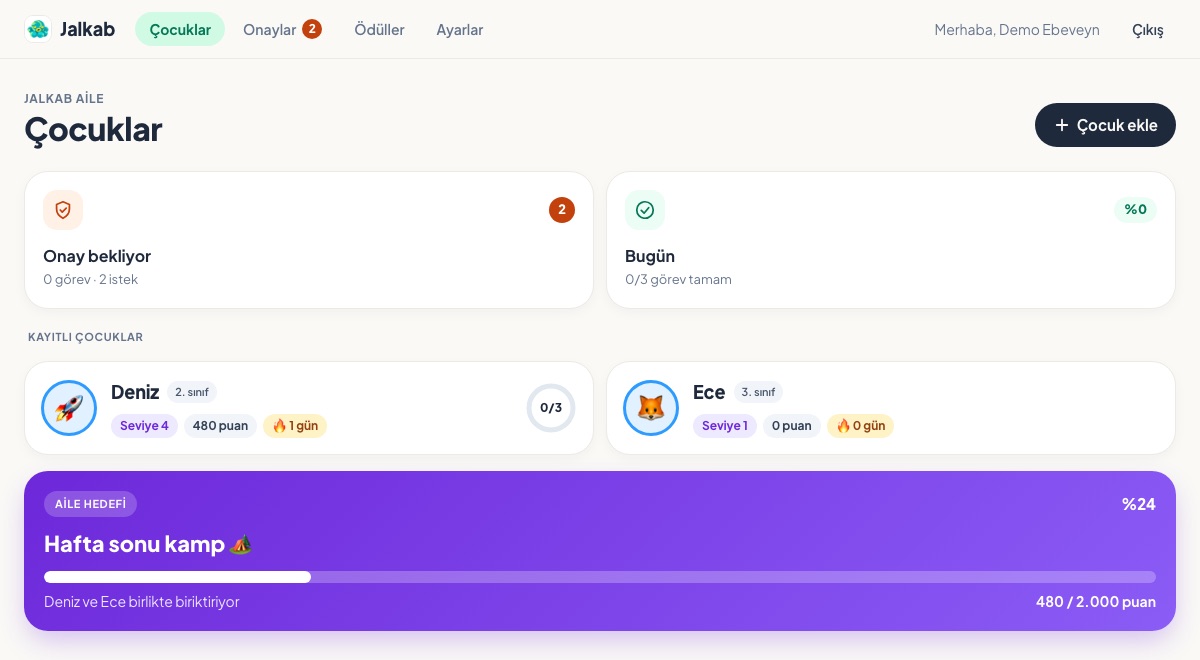
Why Jalkab?
What families can rely on.
Fair points
Points come from finished and approved tasks and are counted on our server, never on a device. Spending them on a reward never lowers the level.
Private by design
The leaderboard shows only a generated nickname, an avatar and the weekly points. Family notes stay with the parents and never go to the AI.
Made for the whole family
Several children, each with their own rewards, theme and schedule. A second parent joins with an invite code.
For children and for parents
On the watch, for the child
- Today’s tasks one at a time, with their points
- “Done!” with a celebration and the parent’s message
- Level, streak and badges
- Rewards to buy with points, and a personal goal
- Wishes from a list or by dictation
- The week’s lessons, courses and sports
On the iPhone and the web, for parents
- Plan days and copy a plan to another day
- Routines: every day, weekdays, weekends or chosen days
- Approve with a bonus and a message, or send back with “Not yet”
- Rewards, milestones and a family goal
- Weekly report with full days and categories
- Notifications for approvals and requests
Tasks, routines and rewards
Everything a family day needs: ready to start with, and yours to change.
Daily tasks
Tasks for one day, from your own ideas or from AI suggestions.- Chores
- Self-care
- Reading
- Movement
- Learning
Routines
Set a recurring task once; it lands in the plan on each chosen day.- Every day
- Weekdays
- Weekends
- Chosen days
Rewards
A catalogue for the whole family or one child, bought with points.- Movie night
- A new book
- Trip to the playground
- Ice cream
Badges and goals
Levels, badges, milestones and a family goal everyone saves towards.- Week Champion
- 100 Tasks
- Milestones
- Family goal
Set up in three steps, then it’s the child’s turn
Parents set things up once; from then on the watch leads through the day.
A second parent? Create a one-time invite code in Settings and share it: both of you see the same children, plans and approvals.
Join a familyParents
Once, in a few minutes.
- 1
Create an account
Sign in with a code sent by e-mail, or with Apple on the iPhone. No password needed.
- 2
Add your child
Name, grade and watch theme first; weekly schedule, needs and a first goal can follow later.
- 3
Pair the watch
Type the 8-digit code into the watch and you’re done. A watch can be removed at any time.
Child
Every day on the Apple Watch.
- 1
See today’s tasks
One task at a time, with its points and the day’s progress.
- 2
Tap “Done!”
Tasks that need a parent’s OK wait in the approvals; the others count right away.
- 3
Collect points
Level up, keep the streak, earn badges, and buy a reward or save for a goal.
FAQ
Getting started
Which watch does my child need?
An Apple Watch with watchOS 11 or later. Jalkab connects to the internet by itself, so a watch set up with Apple’s Family Setup works without the child having an iPhone.
Do I need the iPhone app?
No. The web panel at app.jalkab.com does everything a parent needs, pairing the watch included. The iPhone app adds notifications and Sign in with Apple.
How do two parents use Jalkab together?
With an invite code. One parent creates it in Settings (valid for 7 days, usable once) and shares it; the other signs in and joins. Both see the same children, plans and approvals.
How are points counted?
On the server, never on a device. Points come from finished and approved tasks, the bonus for a day with every task done and the bonus you give when approving. Rewards are paid from the balance; level, badges and the leaderboard count only earned points.
Which languages are there?
German, English and Turkish. The apps and the web panel follow your choice, and AI suggestions come in the same language.
Privacy and safety
Where is our data stored?
In Europe. The database runs on servers in Frankfurt, and Jalkab is offered from Germany.
What does the AI see?
Only what a suggestion needs: age, grade, interests, needs and the weekly schedule. No names and no family notes. Suggestions are moderated and reach the watch only after you publish them.
Who sees my child on the leaderboard?
Only if you let them. Joining the leaderboard is your choice; other families then see a generated nickname, an avatar and the weekly points, never the name. With fewer than 10 participants nearby, the board widens to the whole region.
What if the watch gets lost?
Remove it in your child’s profile and its access ends at once. A new watch pairs with a new code.
How do we delete our account?
In Settings. Deleting removes the family’s data and every connected account, the paired watches included. If another parent is in the family, only your own account is removed.
Turn the day’s tasks into a game the whole family plays
Sign in with an e-mail code; your first child is set up in a few minutes.